> For the complete documentation index, see [llms.txt](https://docs.ockam.io/llms.txt). Markdown versions of documentation pages are available by appending `.md` to page URLs; this page is available as [Markdown](https://docs.ockam.io/documentation/command.md).
# Command
Command line tools to build and orchestrate secure by design applications.
Ockam Command is our command line interface to build secure by design applications that can trust all data in motion. It makes it easy to orchestrate end-to-end encryption, mutual authentication, key management, credential management, and authorization policy enforcement – at a massive scale.
No more having to design error-prone ad-hoc ways to distribute sensitive credentials and roots of trust. Ockam's integrated approach takes away this complexity and gives you simple tools for:
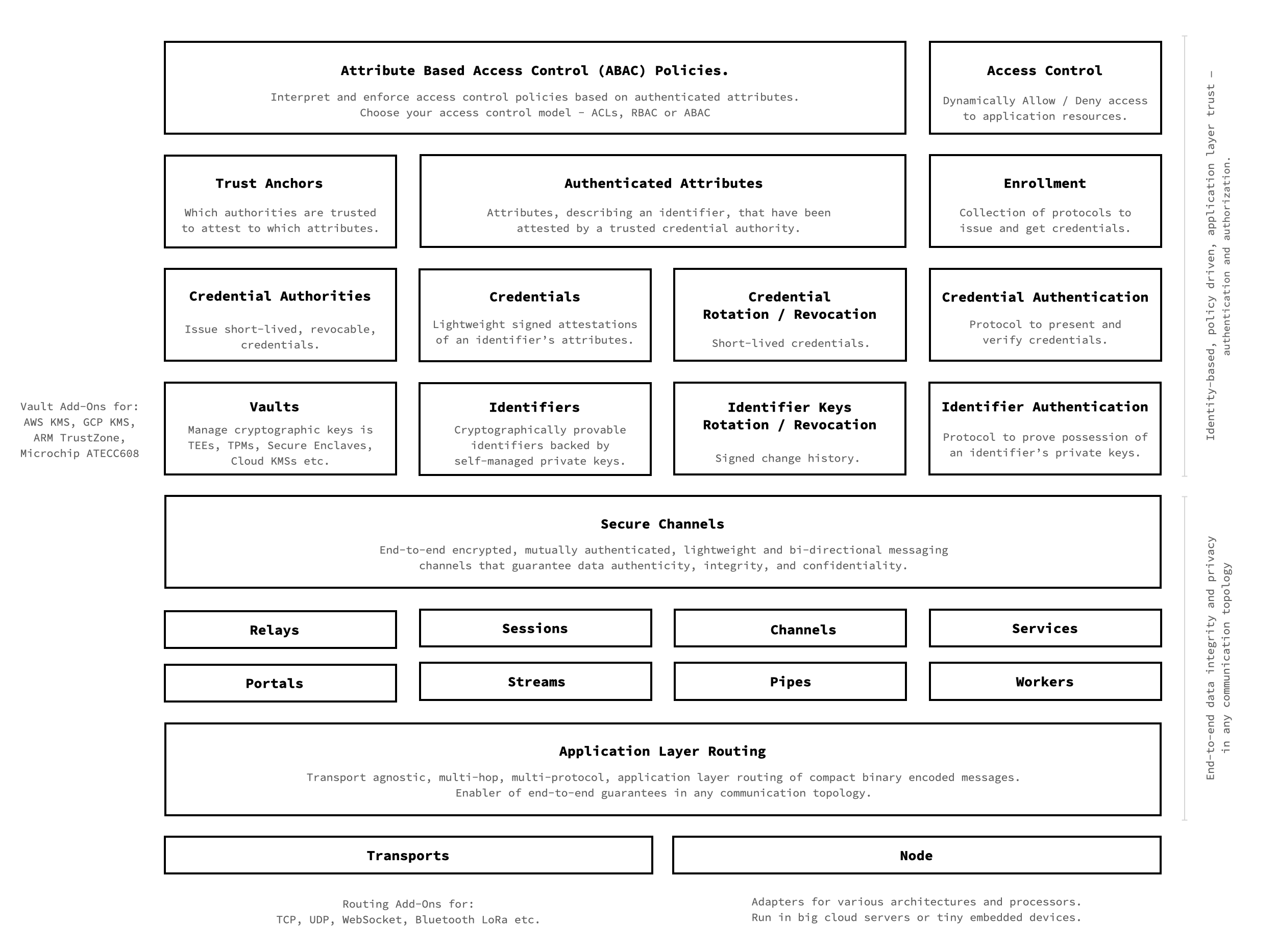
#### End-to-end data authenticity, integrity, and privacy in any communication topology
* Create end-to-end encrypted, authenticated secure channels over any transport topology.
* Create secure channels over multi-hop, multi-protocol routes over TCP, UDP, WebSockets, BLE, etc.
* Provision encrypted relays for applications distributed across many edge, cloud and data-center private networks.
* Make any protocol secure by tunneling it through mutually authenticated and encrypted portals.
* Bring end-to-end encryption to enterprise messaging, pub/sub and event streams - Kafka, Kinesis, RabbitMQ, etc.
#### Identity-based, policy driven, application layer trust – granular authentication and authorization
* Generate cryptographically provable unique identities.
* Store private keys in safe vaults - hardware secure enclaves and cloud key management systems.
* Operate scalable credential authorities to issue lightweight, short-lived, revocable, attribute-based credentials.
* Onboard fleets of self-sovereign application identities using secure enrollment protocols.
* Rotate and revoke keys and credentials – at scale, across fleets.
* Define and enforce project-wide attribute-based access control policies. Choose ABAC, RBAC or ACLs.
* Integrate with enterprise identity providers and policy providers for seamless employee access.
Please click the diagram to see a bigger version.
## A step by step introduction
Ockam Command provides the above collection of composable building blocks that are accessible through various sub-commands. In a step-by-step guide let's walk through various Ockam sub-commands to understand how you can use them to build end-to-end trustful communication for any application in any communication topology.
### Install Ockam Command
If you haven't already, the first step is to install Ockam Command:
{% tabs %}
{% tab title="Homebrew" %}
If you use Homebrew, you can install Ockam using brew.
```sh
# Tap and install Ockam Command
brew install build-trust/ockam/ockam
```
This will download a precompiled binary and add it to your path. If you don't use Homebrew, you can also install on Linux and macOS systems using curl. See instructions for other systems in the next tab.
{% endtab %}
{% tab title="Other Systems " %}
On Linux and macOS, you can download precompiled binaries for your architecture using curl.
```shell
curl --proto '=https' --tlsv1.2 -sSf \
https://raw.githubusercontent.com/build-trust/ockam/develop/install.sh | bash
```
This will download a precompiled binary and add it to your path. If the above instructions don't work on your machine, please [post a question](https://github.com/build-trust/ockam/discussions), we'd love to help.
{% endtab %}
{% endtabs %}
Check that everything was installed correctly by enrolling with Ockam Orchestrator. This will create a [Space](/documentation/command/nodes.md#space) and [Project](/documentation/command/nodes.md#project) for you in Ockam Orchestrator.
```sh
ockam enroll
```
Next, let's dive in and learn how to use [Nodes and Workers](/documentation/command/nodes.md).
---
# Agent Instructions
This documentation is published with GitBook. GitBook is the documentation platform designed so that both humans and AI agents can read, navigate, and reason over technical content effectively. Learn more at gitbook.com.
## Querying This Documentation
If you need additional information that is not directly available in this page, you can query the documentation by asking a question.
Perform an HTTP GET request on the following URL with the `ask` and `goal` query parameters:
```
GET https://docs.ockam.io/documentation/command.md?ask=&goal=
```
`ask` is the immediate question: it should be specific, self-contained, and written in natural language.
`goal` is what the user is ultimately trying to achieve, the reason they need the answer. Sharing it helps GitBook give you a better, more relevant answer. A goal is most helpful when it describes the outcome the user wants rather than restating the question. For example, with `ask=how do I create an API token`, a goal like `automate deployments from our CI pipeline` lets GitBook tailor the answer to that use case.
The response will contain a direct answer to the question and relevant excerpts and sources from the documentation.
Use this mechanism when the answer is not explicitly present in the current page, you need clarification or additional context, or you want to retrieve related documentation sections.